Laptop memory (otherwise known as RAM) is where programs reside while in use so having a good amount of it will help provide a good user experience with regards to how smooth applications and/or games will run. The more memory you have the less often the operating system will have to swap to a much slower hard disk to make room in RAM if you launch another program or have several running at once.
Not to be confused with storage space, both memory and storage are defined by the same units such as GB or gigabytes. If you’re reading the specs of a laptop in a brochure or online and you see both “8GB” and “500GB” in the same line the smaller number will most likely be the one referring to the amount of memory the laptop comes with. If you see “1TB” it means 1 terabyte and refers to storage space.
Laptop memory modules are similar than the ones used on desktop PC’s but come in a smaller form factor called SODIMM (or SO-DIMM) which stands for Small Outline Dual Inline Memory Module. Other than the small form there is also the limitation of how many memory slots are available to add more modules.
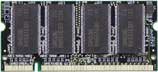
Laptop memory module or SODIMM
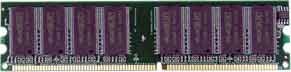
Desktop memory module or DIMM
Tips for Upgrading Laptop Memory
There are several types of memory available and speeds within those types. Your laptop will only be compatible with a specific type up to a certain speed.
Say, for example, your laptop motherboard only supports DDR2 memory then you must buy DDR2 because other types would not work either due to motherboard support or having a physically different slot (DDR3 204 pin vs DDR/DDR2 200 pin).
You will also encounter various speeds of memory available when buying. The speed is normally defined in megahertz (MHZ) by the number following the type of memory: e.g. DDR2 800 or DDR3 1333.
There shouldn’t be any issues using higher speed rated memory in place of your original slower modules as long as they are also the same type such as DDR2 800 in a slot originally occupied by DDR2 667.
DDR2 800 should work in place of DDR2 667 but it would only operate at the DDR2 667 speed if that is the maximum your laptop motherboard supports. If you mixed memory which are rated for different speeds they would only operate at the speed of the slowest module installed or the maximum speed allowed by the motherboard.
Always check to make sure upgrading the memory yourself will not void any warranty, get the right type, and check the manual or manufacturers website for proper upgrade instructions.